Free Google review link generator and QR code
Get a one-tap review link, a QR code and a printable review sign for your Google Business Profile (formerly Google My Business). Paste a Google Maps link, a share link, or a Place ID. No login, no API key, and we show you the real URL so it is yours to keep.
How to get your Google review link: 3 ways
Every route ends at the same place: a link that opens the review box for your listing. Pick the one that fits what you have in front of you.
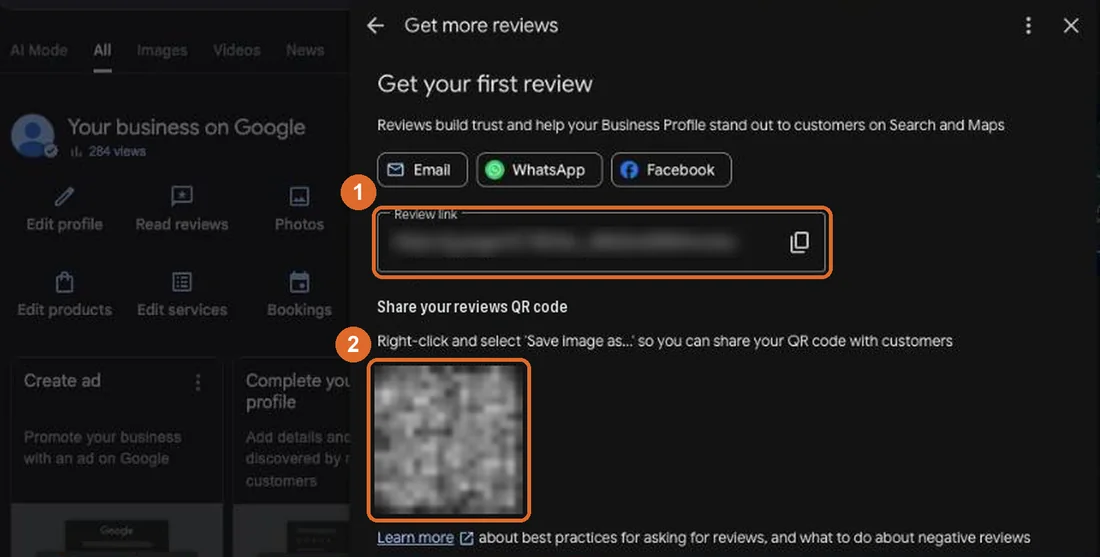
Sign in to the Google account that manages the listing, find your business on Google, click Read reviews, then Get more reviews, and copy the short link it shows (it looks like g.page/r/.../review). This needs owner or manager access. You can paste that link into the tool above to get a QR code and a printable card for it.
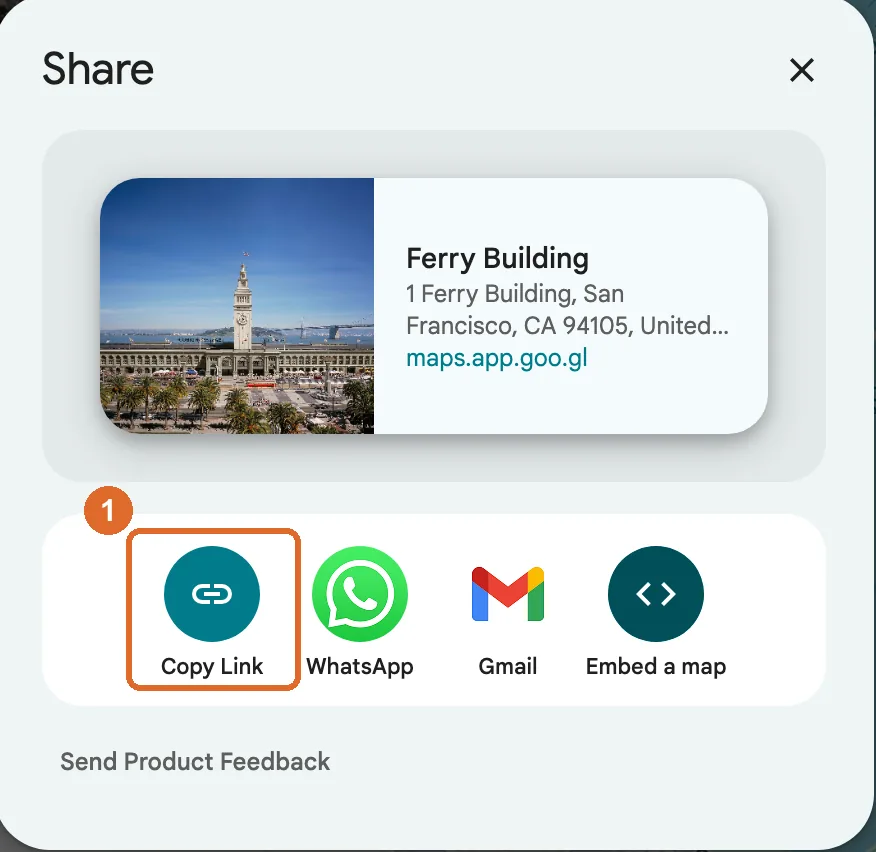
Open your business on Google Maps, tap Share, and copy the link. Paste it into the tool above and we turn it into a one-tap review link. No owner access needed, so this also works when someone else manages the profile.
Paste a Place ID (it starts with ChIJ) and we build https://search.google.com/local/writereview?placeid=YOUR_PLACE_ID for you. Use this if the other two are not available; the Place ID section further down shows how to look it up.
Does Google make a review QR code for you?
Yes, if you own or manage the listing. In your Business Profile, open Read reviews, then Get more reviews, and you can copy the link or save the QR image. Google's help page says the QR code can only be generated from a computer browser. The tool above works on any device, for any listing, and adds print-ready signs.
Google review link format
A Google review link is your Place ID dropped into this URL. Replace YOUR_PLACE_ID with the ChIJ code for your listing:
https://search.google.com/local/writereview?placeid=YOUR_PLACE_IDFor example, Google's own sample Place ID gives https://search.google.com/local/writereview?placeid=ChIJN1t_tDeuEmsRUsoyG83frY4. The short form Google Business Profile hands owners looks like https://g.page/r/YOUR_CODE/review and opens the same review box.
If you only have the numeric business ID (the CID) and no Place ID, the working alternative is https://www.google.com/maps?cid=YOUR_CID. It opens your listing rather than the review box, so the customer taps Write a review themselves. That is one extra tap, which is why the tool prefers the Place ID link whenever it can find one.
What is a Google review link?
A Google review link is a direct link that opens the write-a-review box for your business. Tap it and the rating and comment screen appears immediately, no searching, no scrolling to find the button. That one small shortcut is the difference between a customer who means to leave a review and a customer who actually does. Every extra step you remove between the ask and the review lifts your response rate, and a direct link removes almost all of them.
Under the hood, the link points at your business using its Place ID, Google's unique identifier for your listing. This tool builds the standard search.google.com/local/writereview deep link, the same write-a-review format used across the industry, and shows you the exact URL it produced so nothing is hidden behind a redirect you do not control.
How to generate your Google review link
Generate your review link in three steps, then download the QR code.
Open your business on Google Maps, tap Share, and copy the link. A maps.app.goo.gl short link is fine. If that ever fails, look up your Place ID with Google's free Place ID Finder and use that instead.
Drop the share link, Maps link or Place ID into the box above and click Generate review link. The tool reads out the ID it needs.
Your one-tap review link appears in full. Copy it with one click and paste it into an email, an SMS, or a button on your site.
Grab the QR as a PNG or SVG, or pick a printable sign (table tent, A4 poster, round sticker or business card), add your business name, and put it wherever your customers are.
How to find your Place ID (only if the Maps link fails)
The most reliable input is your Place ID, the ChIJ code Google uses to identify your listing. It is free to look up and it never changes. Open Google's official Place ID Finder, type your business name, and it shows the ID on the map. Copy it and paste it into the tool above.
Open Google's Place ID FinderHow to share your review link
Add the link as a clear button in your thank-you and follow-up emails. Ask right after a win, while the good feeling is fresh.
Text the link the same day you deliver. A short message with one tappable link converts better than any long request.
Print the QR on receipts, business cards, packaging, and table tents. Customers scan with their camera and land on the review screen.
Put the link on a Thanks page, in your email signature, or behind a Leave a review button so it is always one click away.
Google review QR code size and placement
A QR code scans reliably when it is about one tenth as wide as the distance people scan from. Never go below 2 cm (0.8 in), keep a white border, and test it with your own phone before you print a batch.
| Where it goes | Scan distance | QR width | Sign to use |
|---|---|---|---|
| Business card, receipt | 10 to 20 cm | 2 to 2.5 cm (0.8 to 1 in) | Business card |
| Counter, table, reception desk | 30 to 50 cm | 4 to 5 cm (1.6 to 2 in) | Table tent |
| Packaging, bags, delivery boxes | 20 to 40 cm | 3 to 4 cm (1.2 to 1.6 in) | Round sticker |
| Door or window | 1 m | 10 cm (4 in) | Round sticker or poster |
| Wall poster, waiting room | 1 to 2 m | 10 to 20 cm (4 to 8 in) | A4 poster |
Then show your best reviews on your website
Reviews on Google help people find you. The same reviews on your own pages help them buy. testimonials.ltd copies your Google reviews word for word from your Maps link and shows them in a widget like this one, filtered by stars, in your colours.

Super tool to manage your LinkedIn posts and much more! Highly recommended.

Very useful tool to keep engaged with intuitive ability to comment and create content.


Legit feels like cloning myself. Trained it once, gave it my VA, and now I barely touch Linkedin!



It has helped me streamlined my LinkedIn posting with high quality writing which actually sounds like me.

80% of the comments it generates are "ready to use" but sometimes the quality feels a bit off. Not sure why. But good overall.

I've used LiGo for 3 months now. It's been very helpful for me and my team. I usually use it word my ideas in a nicer way.


How to get more Google reviews
- Ask at the peak. Send the link right after a good experience, not weeks later.
- Make it one tap. Send the direct link, never make people search for you.
- Ask a real person, not a list. A short, personal message beats a mass blast.
- Give the QR a home. Put it where customers already have a phone in hand.
- Reply to every review. Public replies show you care and nudge others to write. If you are not sure where they are, here is how to see all your Google reviews.
- Send one gentle nudge. A single friendly reminder recovers a lot of quiet yeses.
- Never buy or gate reviews. It breaks Google's rules and readers can smell it.
- For the full playbook, read how to get more Google reviews and how to respond to Google reviews.
Turn your review link into a review page
Customers write or record a testimonial on your own page, then tap through to post it on Google. You show the best ones on your website, in your colours. See the no-login testimonial form.
Google review link generator FAQ
Is this Google review link generator free?
Yes, completely free. There is no login, no account, no credit card, and no API key. Paste your Google Maps link or Place ID, generate the link, copy it, and download the QR code as many times as you like.
Is this a Google review generator?
It generates the link, not the review. Customers tap it and land straight in your Google review box, so real customers can leave a review in seconds.
Do I need to sign up or log in?
No. The tool runs in your browser and there is nothing to sign up for. The only thing that ever reaches our server is a Google short link (maps.app.goo.gl, goo.gl/maps, g.page or g.co/kgs), which we open once to read the full Maps address behind it. We do not store it. Generate your link and go.
What is a Google review link?
It is a direct link that opens the review box for your business, so a customer can leave a rating and a comment in one tap. Instead of asking people to search for you on Google Maps and hunt for the review button, you send one link that drops them straight into the write-a-review screen.
What is a Place ID?
A Place ID is Google's unique identifier for a specific business or location, usually starting with the letters ChIJ. Google uses it to point precisely at your listing. It is the most reliable input for building a clean review link, and you can look yours up for free with Google's Place ID Finder.
How do I find my Place ID or Maps link?
The quickest way: open your business on Google Maps, tap Share, and copy that link. If that ever fails, open Google's Place ID Finder, search for your business name, and copy the ID it shows. Either one works: paste it into the tool and it extracts what it needs.
What review link format does this use?
For a ChIJ Place ID we build https://search.google.com/local/writereview?placeid=YOUR_PLACE_ID, the widely used write-a-review deep link. If your Maps link only exposes a business ID (a CID), we build a working link from that instead. The tool always shows you the exact URL it generated.
Can I make a QR code for my Google reviews?
Yes. Once your link is generated, the tool renders a QR code you can download as a PNG or an SVG, plus four ready-to-print signs: a table tent, an A4 poster, a round sticker and a business card. Customers scan it with their phone camera and land on your review form.
What is the difference between the PNG and SVG QR downloads?
The PNG is a ready-to-use image, great for slides, emails, and quick prints. The SVG is a vector file that stays razor sharp at any size, so it is the better choice for large-format printing, signage, and professional design work. Most tools only give you a PNG. This one gives you both.
Do I need a Google Business Profile to collect reviews?
To collect reviews on Google, yes: reviews live on your Google Business Profile listing, so the listing has to exist and be verified. This tool does not create the listing for you. If you do not have a profile yet, set one up first, then come back and generate your link. If you want to collect testimonials on your own site without a Google profile, testimonials.ltd handles that.
Can I get a Google review link without logging in to Google Business Profile?
Yes. The link only needs your listing's Place ID, which is public. You do not need owner access or a login: find the business on Google Maps, share it, and paste the link here. The listing itself must exist on Google, because the review attaches to it. If you have no Google listing at all, collect testimonials on your own site instead.
Is this a GMB review link generator?
Yes. Google My Business was renamed Google Business Profile in 2021. The review link works the same for any GMB or Business Profile listing.
Can I make a link that opens with 5 stars selected?
No. Google does not support pre-filled star ratings, and asking only happy customers (review gating) breaks Google's review policy. Send the same link to every customer.
Does it work with a maps.app.goo.gl share link?
Yes. Paste the short link from the Share button and we read the business ID from it. If you already have a g.page/r/.../review link from your Business Profile, paste that and we keep it as it is and make the QR code from it.
Is a QR code better than a link?
They are for different moments. A link is best for email, SMS, chat, and your website, anywhere someone is already on a screen. A QR code is best in the physical world: on a receipt, a card, a table tent, or packaging, where the customer has your product in hand and a phone in their pocket. Use both.
How do I create a QR code for Google reviews?
Paste your Google Maps share link or Place ID into the tool above and click Generate review link. The QR code appears under your link. Download it as a PNG or SVG, or pick a sign (table tent, poster, sticker or business card), add your business name, and download or print it. Google also offers a QR code inside Business Profile, but only from a computer browser and only to verified owners or managers.
Does a Google review QR code expire?
No. The QR code stores your review link directly, with no redirect in between, so it keeps working for as long as your Google listing exists. It only stops working if the listing is removed or replaced by a new one, for example after a move that creates a new profile. In that case, generate a new link and print a new code.
What size should a Google review QR code be?
At least 2 cm (0.8 in) wide on a business card or receipt. As a rule of thumb, make the code about one tenth of the distance people scan from: a counter card read from 50 cm needs about 5 cm, a window poster read from 2 m needs about 20 cm. Keep a white border around it and print dark on light.
Can customers leave a Google review without a Google account?
No. Google only accepts reviews from people signed in to a Google account, so the link asks customers to sign in if they are not already. Most phone users are signed in through Gmail, YouTube or Android, so for them it is one tap.
Can I give a discount in exchange for a Google review?
No. Google's review policy prohibits offering incentives such as discounts or free items in exchange for a review, and reviews written for a reward can be removed. Ask every customer the same way, with no reward attached.
Why show the actual review URL?
So you can trust it, save it, and reuse it anywhere without being tied to this tool. Many generators hide the URL and hand you a shortened redirect you do not control. We show the real Google link so it is yours to keep.
Will this work for any country or language?
Yes. The write-a-review link is the same structure worldwide, and Google shows the review screen in the customer's own language automatically. Your Place ID is all that changes.
Keep building your review flow
Turn your Facebook Page link or username into a direct reviews link. Get the real URL, a QR code (PNG and SVG), and printable review signs. No login.
Open toolBuild a testimonial widget in your browser: grid, carousel, slider, or marquee. Live preview, light or dark, then copy self-contained embed HTML. No signup.
Open toolA gallery of copy-paste testimonial layouts: grid, wall of love, carousel, spotlight, video, and more. Live preview, then lift the self-contained HTML and CSS. No login.
Open toolPick your business type and get the exact questions to ask for a great testimonial, grouped and ready to copy. Curated per vertical, no login, no AI wait.
Open toolPick a tone and who you are asking, and a ready-to-send request email writes itself. Choose a subject line, copy it, drop in your form link. Instant, no signup.
Open tool.ltd = Lifetime Deal. Collect testimonials. Pay once. Keep them forever.